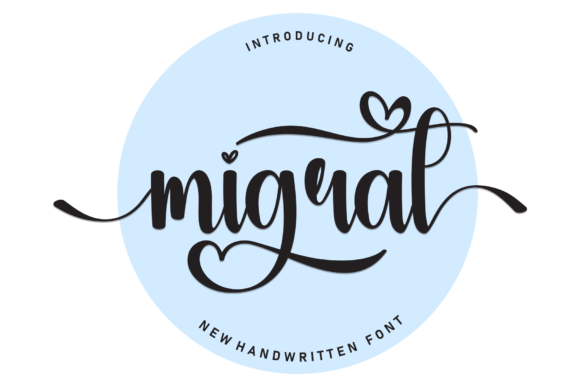
Migrat: A Friendly Handwritten Font
As a web designer, I'm always on the lookout for fonts that bring personality to a digital project without sacrificing usability. Migrat caught my attention during a recent redesign of a boutique online store. Its soft, handwritten style felt just right for creating a warm and approachable brand identity.
The first time I tested Migrat in a hero section, it immediately stood out. The font's natural flow and unique character gave the design a human touch that felt refreshing. It wasn't too ornate, but it had enough variation to feel authentic and engaging. This made it perfect for headlines and call-to-action buttons where I wanted to evoke a sense of trust and creativity.
Visual Characteristics and Digital Appeal
Migrat has a distinct personality. It feels like it was written by hand, with subtle variations in stroke weight and spacing that make it feel organic. This quality makes it ideal for projects that aim to convey a personal or artisanal vibe. Whether it's used in a portfolio site or a coaching website, Migrat adds a layer of warmth that can't be replicated with more rigid typefaces.
Its visual appeal is especially strong when paired with clean, modern layouts. I found that using Migrat for headings and subheadings created a nice contrast against simpler body text. This balance helped maintain readability while keeping the design visually interesting.
Real-World Applications
One of the most practical uses of Migrat is in landing pages and product banners. For a course sales page, I used it for the main headline, which helped draw attention without overwhelming the viewer. The font's friendly nature made it feel inviting, encouraging users to explore further.
I also experimented with Migrat on a blog header. It worked well as a decorative element, adding a personal touch that aligned with the content's tone. However, I noticed that it wasn't as effective for long paragraphs of text. That's where a complementary sans serif font came in handy, providing clarity and structure to the overall layout.
Readability and User Experience
When testing Migrat on mobile screens, I paid close attention to how it performed in different contexts. On smaller devices, the font remained legible, but I made sure to keep its use limited to short phrases and headings. For body text, I switched to a more traditional font to ensure that readers could easily scan through the content.
On dark backgrounds, Migrat retained its clarity, but I adjusted the line height and spacing to prevent it from feeling cramped. With light backgrounds, the font looked clean and crisp, making it a good choice for image overlays and banner designs.
Font Pairing and Design Strategy
Pairing Migrat with other fonts can enhance the overall design. I often pair it with a simple sans serif for body copy, which creates a clear visual hierarchy. This combination works well for websites that need to balance creativity with functionality.
For editorial-style designs, I've used Migrat alongside a serif font to create a more traditional and sophisticated look. This pairing is great for blogs, magazines, or any project that aims to feel more polished and professional.
Practical Considerations
Before implementing Migrat on a website, it's important to check the available styles and weights. Some fonts come with multiple variations that can be useful for different design needs. I also recommend reviewing the font's multilingual support, especially if the project targets international audiences.
Commercial licensing is another key factor. Make sure the font is properly licensed for web use, especially if it's going to be used on client projects or public-facing websites. Migrat's availability as a webfont makes it easy to integrate into CSS, which is a big plus for designers working on responsive layouts.
Overall, Migrat is a versatile and appealing font that can elevate a wide range of digital projects. Whether you're building a creative portfolio, a coaching website, or an online store, it offers a unique blend of style and usability that can help your brand stand out.
By thoughtfully integrating Migrat into your design workflow, you can create a more engaging and memorable user experience. Its friendly and expressive nature makes it a valuable addition to any designer's toolkit, especially when used in the right context and paired with complementary typefaces.